

Monkey See, Monkey Prototype
2026: Are We There Yet?
"Instead of hiring engineers to work with a factory in Shenzhen (or Baja California) to create a product sample, today an inventor can try out a new concept with simulated models and 3D printed mockups. Even your school might have a “makerspace” that you can use to channel your inner Thomas Edison—or Sarah Boone. Consider the advantages and disadvantages of such rapid prototyping, then discuss with your team: should access to these tools be limited to those who can use them responsibly?"Products can have rough drafts too. To see how well they work and what people think of them, companies often create early samples—or prototypes—of potential products. Here are some examples of prototypes that turned into popular gadgets and gizmos (aplenty); sometimes, as in the case of the iPhone, they may look nothing like the product that ultimately made it to market. Learn more about the prototyping cycle by researching the the terms below, then discuss with your team: are there other things in life that would benefit from prototyping? Is there any difference between a prototype and a draft?"
-
The Nintendo PlayStation was a canceled 1991 collaboration between Nintendo and Sony for a SNES CD‑ROM system.
-
The Game Boy Color was backward compatible with the original Game Boy and expanded its game library.
-
The Motorola DynaTAC was the first portable cell phone, with early calls often dialing the wrong number.
-
The Apple I was initially sold to hobbyists before being released as a full computer.
-
The Atari VCS, later called the 2600, was one of the first consoles to use a microprocessor and ROM cartridges.
-
The Super Soaker started as a prototype using PVC pipes and a soda bottle to create a powerful water gun.
-
Early push‑button phones were tested in the 1940s and became official as Touch‑Tone phones in 1963.
-
The Wii U improved on the original Wii by adding HD graphics and new gameplay features.
-
The first Xbox prototypes were built from modified laptops to run DirectX games.
-
The iPad began as Steve Jobs’ idea for a portable computer in a book‑like format.
-
Early iPhone prototypes in the 1980s explored touchscreen and stylus input.
-
Apple’s original iPhone was developed in secret, and the prototype was internally called “M68” and “Purple 2.”
-
The prototype development board looked much more like a conventional PC motherboard than a finished phone.
-
The board was built on a red printed circuit board, while final production units used blue or green boards.
-
It was an Engineering Validation Test (EVT) sample used by engineers working on the software and radio components.
-
The prototype had nearly all of the iPhone’s parts spread across the board so engineers could easily replace or modify components.
-
It included testing ports such as serial and dual mini USB, used to access different hardware parts like the application processor and radio.
-
The board had a SIM card slot and even an RJ11 port to test voice calls.
-
Some versions of the prototype had a built‑in display, while others did not, requiring connection to external monitors using RCA or component video ports.
-
Engineers used features like JTAG connectors for low‑level debugging of hardware and firmware.
-
When connected to iTunes, the prototype board was recognized as an iPhone.
-
Prototyping is the process of making early versions of a product so you can see, touch, test, and refine ideas before final design.
-
The first step is ideation and conceptualisation, where you brainstorm ideas and define the problem the product will solve.
-
Next, you make low‑fidelity prototypes, which are simple sketches or wireframes focusing on basic structure and flow.
-
After that comes high‑fidelity prototypes, which look and feel closer to the final product with more detail and interactivity.
-
Once refined, you reach the final design and handoff, where the prototype becomes a detailed blueprint for developers.
-
There are different types of prototypes, including paper sketches, digital wireframes, interactive models, 3D physical models, and storyboards.
-
Tools often used for creating prototypes include Figma, Adobe XD, Sketch, InVision, Balsamiq, and Marvel.
-
Common challenges include scope creep, over‑polishing too early, ignoring feedback, and poor user testing.
sketches:
-
Sketches are a type of low‑fidelity prototype.
-
They are simple drawings that show basic structure, layout, and flow.
-
Sketches help visualize ideas quickly before building digital or physical prototypes.
-
They allow fast iteration and easy changes.
-
Sketches improve team communication and clarify concepts for stakeholders.
-
They are often the first step in moving from idea to prototype.
storyboarding:
-
Storyboarding is a visual sequence showing how a user interacts with a product over time.
-
It helps designers plan user experience and workflows before building prototypes.
-
Storyboards use drawings, sketches, or images to represent each step or screen.
-
They are useful for communicating ideas to team members and stakeholders.
-
Storyboarding allows early testing of interactions and spotting potential issues.
-
It is often used alongside low‑fidelity sketches and wireframes in the early design phase.
paper prototypes:
-
Paper prototypes are low‑fidelity physical models of a product, often made with paper or sticky notes.
-
They are used to test ideas, layout, and basic functionality quickly and cheaply.
-
Paper prototypes allow fast iteration because changes are easy to make.
-
They help gather user feedback early before digital or high-fidelity prototypes are made.
-
They improve team communication by showing concepts visually.
-
Often used for user interface design, like apps or websites, to map screens and workflows.
low vs. high fidelity:
-
Low‑fidelity prototypes are simple, quick, and cheap.
-
They include sketches, paper prototypes, and basic wireframes.
-
Low‑fidelity prototypes focus on structure, layout, and flow, not details or visual design.
-
They allow fast iteration and early user feedback.
-
High‑fidelity prototypes are detailed and interactive, looking close to the final product.
-
High‑fidelity prototypes include colors, typography, real images, and working interactions.
-
Low‑fidelity is best for early concepts, high‑fidelity is best for refinement.
wireframing:
-
Wireframing is a low‑fidelity blueprint of a digital product like a website or app.
-
It shows the layout, structure, and placement of elements without focusing on colors or design details.
-
Wireframes help plan user flow and navigation before high-fidelity design.
-
They are quick to create and easy to modify.
-
Wireframing improves team communication and aligns designers, developers, and stakeholders.
-
It is often used alongside sketches and storyboards in early design phases.
mockup:
-
Mockups are high‑fidelity static designs that show what the final product will look like.
-
They include visual design elements like colors, typography, images, and layout.
-
Mockups do not usually have interactive features like high-fidelity prototypes.
-
They are used to present design to stakeholders and get approval before development.
-
Mockups help bridge the gap between wireframes (structure) and fully interactive prototypes.
-
Often created using tools like Figma, Adobe XD, or Sketch.
proof of concept:
-
A proof of concept (POC) is an early model or test to show that an idea or technology works.
-
It focuses on validating functionality or technical feasibility, not design or user experience.
-
POCs are usually small-scale and experimental, often using minimal resources.
-
They help identify risks, technical challenges, and viability before full development.
-
POCs can guide stakeholders and teams on whether to invest time and money in a project.
-
Often done before prototypes and can inform low- and high-fidelity design decisions.
user testing:
-
User testing is the process of observing real users interact with a prototype or product.
-
It helps identify usability issues, pain points, and areas of confusion.
-
It can be done with low‑fidelity or high‑fidelity prototypes depending on the stage of design.
-
It provides feedback for iteration and improvement before final development.
-
It can be formal (structured tasks) or informal (casual observation).
minimum viable product:
-
A Minimum Viable Product (MVP) is the simplest version of a product with just enough features to satisfy early users.
-
It is used to test market demand and gather user feedback before full development.
-
MVPs focus on core functionality, leaving non-essential features for later iterations.
-
It helps reduce development risk, save time and resources, and guide product improvements.
-
Early feedback from MVP users informs future design, features, and priorities.
-
It often releases quickly to real users to give their ideas and assumptions.
minimum marketable feature:
-
A Minimum Marketable Feature (MMF) is the smallest unit of functionality that delivers value to users.
-
It focuses on solving a specific user problem or meeting a clear need.
-
MMFs can be released individually to provide early value while the rest of the product is still in development.
-
MMFs differ from MVPs because they focus on marketable value, not just testing an idea.
"Instead of hiring engineers to work with a factory in Shenzhen (or Baja California) to create a product sample, today an inventor can try out a new concept with simulated models and 3D printed mockups. Even your school might have a “makerspace” that you can use to channel your inner Thomas Edison—or Sarah Boone. Consider the advantages and disadvantages of such rapid prototyping, then discuss with your team: should access to these tools be limited to those who can use them responsibly?"
-
Sarah Boone was born Sarah Marshall around 1832 in Craven County, North Carolina.
-
She was the daughter of enslaved parents.
-
In 1847 she married James Boone, a free African American, and it is likely she gained her freedom through marriage.
-
She and her family moved to New Haven, Connecticut before the Civil War, where she worked as a dressmaker and her husband worked as a bricklayer.
-
Boone had eight children and owned her own home in New Haven.
-
As a dressmaker, she encountered challenges ironing fitted garments like sleeves using the flat boards common at the time.
-
To solve this, she designed an improved ironing board that was narrower, curved, and better suited for ironing sleeves and bodies of women’s clothing.
-
Her board was padded, making it more convenient and efficient than the prior method of ironing on a plank or table.
-
Boone applied for a patent on July 23, 1891, and was awarded U.S. Patent No. 473,653 on April 26, 1892, for her invention.
-
She became one of the first African American women to be awarded a U.S. patent.
-
Although there is limited evidence she profited financially, her design became the prototype for modern ironing boards still used today.
-
Rapid prototyping refers to techniques that create physical models from digital designs.
-
Common steps include creating a full‑scale model in CAD, exporting it to an STL file, sending it to a machine, and then manufacturing and cleaning the prototype.
-
Stereolithography (SLA) uses a laser and photosensitive resin to build models layer by layer.
-
Laminated Object Manufacturing (LOM) cuts material into layers and glues them together to form parts.
-
Advantages of rapid prototyping include producing intricate prototypes, fast design changes, and the ability to use models for user testing.
-
Disadvantages can include slower processing and the need for support structures, depending on the technique.
"In the world of software, AI-powered vibe coding allows users to create programs without writing a line of code. Just ask a chatbot for what you want and watch it appear. You might want to try vibe-coding yourself, then discuss with your team: should we be worried about a future flooded with too many programs of uncertain quality and with limited support? Is it better if not everyone can get “there” so easily?"
-
Vibe coding is a new software development practice where developers describe what they want in plain language and AI generates code in response.
-
The term was coined by Andrej Karpathy in February 2025 and reflects a shift toward AI‑assisted creation of software.
-
Instead of manually writing each line of code, vibe coding relies on AI tools like large language models (LLMs) to produce code from natural language prompts.
-
The goal is to prioritize creativity and prototyping, letting developers experiment quickly before refining the code.
-
Typical implementation steps include choosing an AI coding assistant, writing a clear prompt, generating base code, refining the prompt and code, and then reviewing and finalizing the code.
-
Common tools that enable vibe coding include platforms like Replit, Cursor, and AI assistants such as GitHub Copilot.
-
Limitations include technical complexity for advanced systems, code quality and performance issues, debugging difficulties, maintenance challenges, and potential security vulnerabilities in AI‑generated code.
"In 1770, a Hungarian engineer announced a startling invention: a machine capable of playing chess. This “Mechanical Turk” toured the world, impressing everyone from Benjamin Franklin to Edgar Allan Poe. There was just one problem: it was not an early example of AI, but a hoax, operated by a chess master hidden within. Companies today may still take a similar approach—known as “Wizard of Oz” testing—to test user response before production. Discuss with your team: is it okay to mislead users during product testing in order to make the finished versions of those products better?"
-
The Turk was a famous chess‑playing “robot” first shown in 1770, built by Hungarian inventor Wolfgang von Kempelen.
-
It looked like an automaton that could play chess on its own, surprising audiences across Europe and later the United States.
-
The machine toured for many years and defeated prominent figures such as Benjamin Franklin and Napoleon Bonaparte.
-
Despite its appearance, the Turk was not actually automated; it was a hoax with a human chess master hidden inside controlling its moves.
-
The deception was well kept during its lifetime and fueled debate about whether machines could truly think.
-
Writers and thinkers, including Edgar Allan Poe, analyzed the Turk and helped popularize early ideas about machine intelligence and artificial minds.
-
Its fame and mystery inspired early discussions about artificial intelligence long before modern computers existed.
-
Wizard of Oz approaches are research and prototyping methods where responses are manually created by hidden operators (“wizards”) while users think they are interacting with a real system.
-
The key idea is to simulate functionality without building a working prototype, so user reactions can be tested quickly and cheaply.
-
“Wizards” act like invisible puppeteers, controlling devices, services, or environments from behind the scenes.
-
Tests usually last from a few hours to a couple of days, depending on scope.
-
Physical and digital prototype elements like paper prototypes, cardboard interfaces, or click models can be used in the setup.
-
Participants perform tasks or scenarios, and the wizard provides responses that appear automated to the user.
-
Outputs can include research data, observations, interview transcripts, videos, and ideas for prototype improvements.
"Elon Musk once unveiled a prototype humanoid robot that turned out to be a dancer in a costume. His more recent demonstrations are closer—but still not quite there. Read about some other examples of companies faking demonstrations of their not-quite-ready products, then discuss with your team: should companies be required to tell people when demos are slightly or entirely rigged?"
-
At Tesla’s AI Day in August 2021, Elon Musk introduced plans for a humanoid robot called the Tesla Bot.
-
Musk said the robot would be about 5 ft 8 in tall and weigh about 56 kg, and could perform “boring, repetitious and dangerous” tasks like attaching bolts to cars or picking up groceries.
-
He suggested Tesla would probably launch a prototype the next year but did not show any real working model at the event.
-
Instead of a functioning robot, Musk brought an actor in a robot‑style bodysuit on stage.
-
The actor breakdanced to electronic dance music as a humorous way to introduce the concept.
-
This moment drew attention because it did not demonstrate real robot technology and appeared more like a theatrical presentation.
-
Tesla has been criticized for staged or misleading demonstrations of its technology, especially its self‑driving Autopilot and Full Self‑Driving (FSD) systems.
-
In a 2016 video promoting Autopilot, a Tesla Model X was shown driving itself through city streets and obeying traffic signals, but the video was later revealed to be staged using predetermined routes and mapping data not available to customers at the time.
-
CEO Elon Musk personally oversaw and promoted the video, including the opening claim that the car was driving itself with no human input, even though that wasn’t technically accurate at the time.
-
Tesla has used these kinds of demos as forward‑looking presentations of what technology could eventually do, rather than what it could reliably do at the moment.
-
Demos of other products like the Tesla Optimus humanoid robot have also been widely mocked or accused of being more theatrical than technologically real, including times when a human or teleoperator appeared to be behind robot actions rather than AI.
"Some companies have even sold products and services that still secretly relied on people to function properly. Amazon’s AI-powered cashiers at their “Just Walk Out” grocery stores were actually overseen by thousands of low-paid workers; Fireflies.ai makes millions a year selling automated notetaking at meetings, but recently revealed that at first their powerful AI was just the founders listening in and writing stuff down. Look for similar cases, then discuss with your team: should companies be punished for releasing successful products and services that once relied on human intervention but no longer do? Is “fake it ‘til you make it” justified as long as you make it in the end?"
-
Amazon is ending its AI‑powered cashier‑free checkout system called Just Walk Out at its Amazon Fresh grocery stores in the U.S. after years of development.
-
Just Walk Out was marketed as a system where shoppers could pick items and simply walk out without scanning or paying at a register.
-
The technology relied on sensors, cameras, and machine learning to detect what customers picked up and charged their accounts automatically.
-
Reports revealed that despite being advertised as AI‑powered, the system required a large number of human reviewers (about 1,000 people in India) to watch and verify video footage for accurate checkouts.
-
Because of reliability, cost, and performance issues, Amazon decided to remove Just Walk Out technology from many Fresh stores and shift toward using smart carts (like Dash Carts) that help track items as shoppers place them inside.
-
Sam Udotong shared that early in Fireflies.ai’s journey, they charged customers $100 per month for an AI meeting notetaker that wasn’t actually automated at all.
-
He and his co‑founder were struggling financially, living month to month with no safety net while developing their business idea.
-
To validate demand before building real technology, they manually took meeting notes when customers thought an AI was doing it.
-
They would dial into customer meetings as “Fred from Fireflies.ai,” silently record detailed notes by hand, and send them later.
-
This manual process continued through over 100 meetings, even leading them to fall asleep during some sessions.
-
The experience provided proof of demand and revenue before they invested time and money into automating the technology.
-
After validating the idea this way, they began building the actual product in 2017, and the company eventually grew to a $1 billion valuation.
-
Udotong describes this approach as “validation before automation,” showing the value of proving customer willingness to pay before building software.

Sketch Example
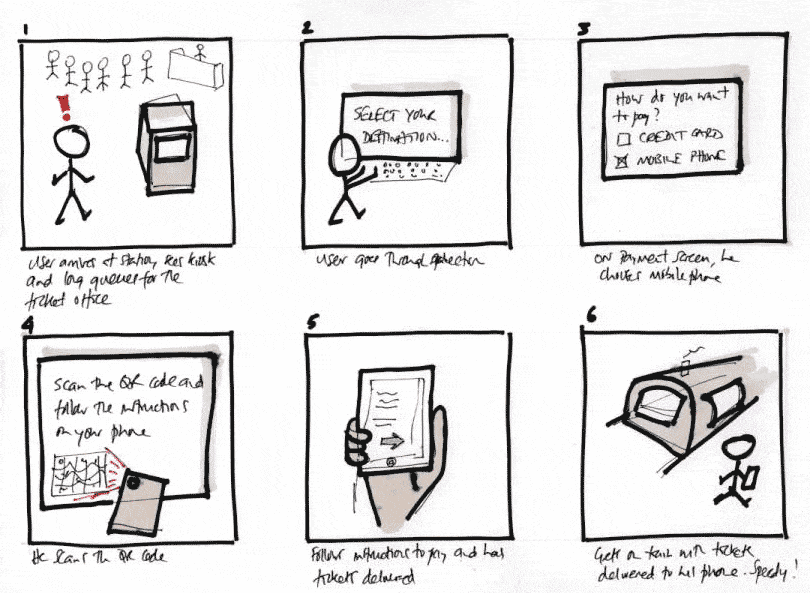
Stroyboarding Example

Paper Prototypes Example

Low vs. High Fidelity Example

Wireframing Example
